Building Rag System From First Principals
What Is RAG?
In general, Large Language Models are incredibly capable. They can answer questions, summarize text, write code, and perform many other tasks.
But they are still general-purpose models. They don't automatically have access to your private or application-specific data.
So, what if you want an LLM to answer questions about your data?
For example, imagine you have an internal company document containing:
"Employees can work remotely for up to 3 days per week."
Now you ask an LLM:
"How many days can I work remotely?"
A general-purpose LLM doesn't automatically have access to that document.
You could provide the document along with the question, but imagine doing this with thousands of documents and hundreds of questions. Sending all that information to the LLM every time would be expensive, inefficient, and eventually run into context limits.
Instead, we can give the LLM access to the information it needs when it needs it.
This is where RAG — Retrieval-Augmented Generation comes in.
The idea is fairly simple:
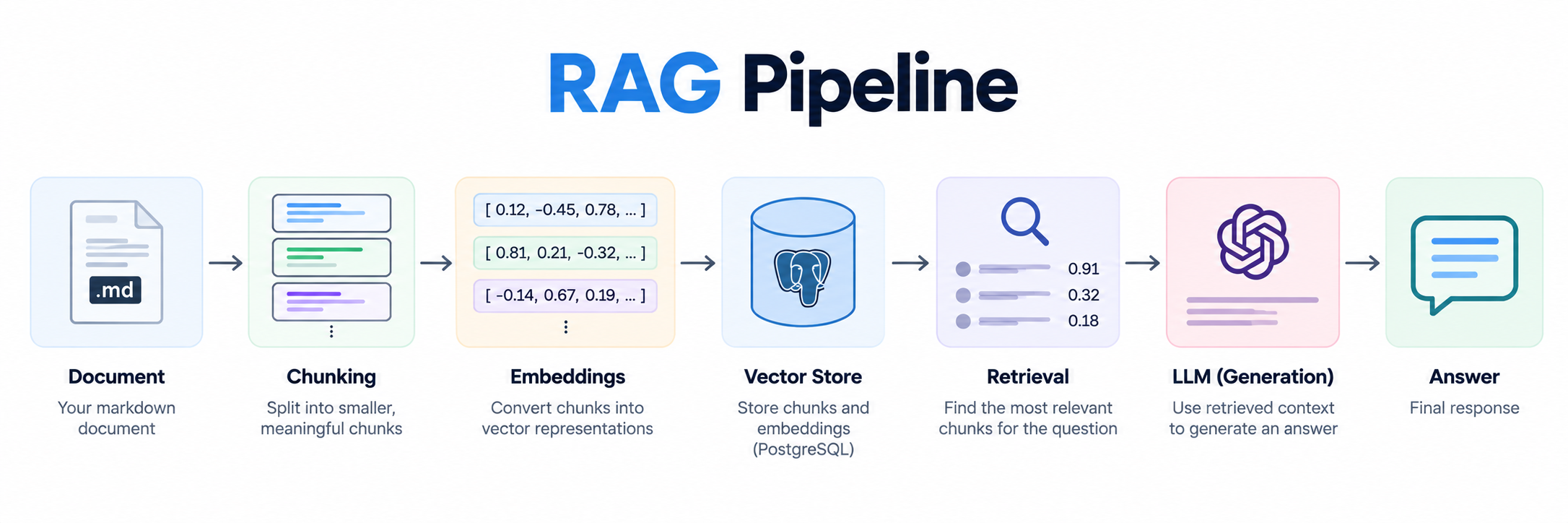
User Question → Retrieve relevant information → Give it to the LLM → Generate an answer
For the same question:
"How many days can I work remotely?"
The RAG system first searches through the available documents and retrieves the relevant information:
"Employees can work remotely for up to 3 days per week."
That information is then passed to the LLM along with the user's question.
The LLM doesn't need to know our company's remote-work policy beforehand. It just needs the relevant context to generate an answer.
And while the basic idea sounds simple, it introduces a few interesting problems.
Let's understand them one by one.
Key Concepts
Chunking
At this point, our biggest problem is that we have to send the whole document as context to the LLM for it to answer our query.
But in most cases, the answer we're looking for might exist in just a small part of that document.
For example, imagine we have a 100-page company policy document, and the user asks:
"How many days can I work remotely?"
The answer might be just one sentence somewhere in those 100 pages.
There is no reason to send all 100 pages to the LLM when we only need that small piece of information.
So the first question becomes:
How can we break a large document into smaller, meaningful pieces so that we can later work with only the relevant context?
This process is called chunking.
Instead of treating the entire document as one large piece of text, we split it into smaller sections called chunks.
For example:
Document
│
├── Chunk 1
├── Chunk 2
├── Chunk 3
├── Chunk 4
└── ...
Now, instead of eventually giving the LLM the entire document, we can aim to give it only the chunks that are relevant to the user's question.
We'll worry about how to find those relevant chunks in the retrieval section.
For now, the important idea is:
We don't need the entire document to answer every question. We need the right part of the document.
And chunking is the first step towards making that possible.
Embeddings
Now we have our document split into smaller chunks.
But we still have a problem.
Suppose we have these chunks:
Chunk 1
Employees can work remotely for up to 3 days per week.
Chunk 2
Employees are eligible for 20 days of annual leave.
Chunk 3
Health insurance covers immediate family members.
And the user asks:
"How many days can I work from home?"
How do we know that Chunk 1 is the relevant one?
A simple keyword search might look for words like work, home, or days. But the question and the chunk don't necessarily have to use the exact same words.
For example:
"How many days can I work from home?"
and
"Employees can work remotely for up to 3 days per week."
use different words, but they have a similar meaning.
This is where embeddings come in.
Essentially, we convert text into a numerical representation called an embedding.
Chunk 1 → [0.12, -0.45, 0.78, ...]
Chunk 2 → [0.81,  0.21, -0.32, ...]
Chunk 3 → [-0.14, 0.67, 0.19, ...]
We can do the same thing with the user's question:
"How many days can I work from home?"
                ↓
        [0.15, -0.42, 0.74, ...]
The important idea is that text with similar semantic meaning should have embeddings that are closer together.
So the embedding for our question should be closer to Chunk 1 than to Chunk 2 or Chunk 3.
This allows us to search based on semantic similarity, rather than relying only on exact keyword matches.
And this idea of converting text into numerical representations isn't unique to RAG.
At a high level, this is also part of how modern language models work: text is ultimately converted into numerical representations that models can process and operate on.
RAG uses a similar idea for a different purpose — we use embeddings to make our documents searchable by meaning.
Now we have:
Document → Chunks → Embeddings
But we still need to compare the user's question against these embeddings and decide which chunks are relevant.
That's where retrieval comes in.
Retrieval
Now we have our document split into chunks, and each chunk has an embedding.
We also have an embedding for the user's question.
But having these embeddings alone doesn't give us an answer.
We need to actually find the chunks that are most relevant to the question.
Let's take our previous example.
The user asks:
"How many days can I work from home?"
We convert the question into an embedding and compare it with the embeddings of our stored chunks.
Conceptually, we might get something like:
Question
   ↓
Question Embedding
   ↓
Compare with chunk embeddings
   ↓
┌─────────────────────────────────────┐
│ Chunk 1 → 0.91                       │
│ Chunk 2 → 0.32                       │
│ Chunk 3 → 0.18                       │
└─────────────────────────────────────┘
Here, the numbers represent how similar each chunk is to the question.
Chunk 1 has the highest similarity, so it is the most relevant chunk.
We can then retrieve the top relevant chunks and provide them as context to the LLM.
User Question
      ↓
   Embedding
      ↓
Semantic Search
      ↓
Relevant Chunks
      ↓
Question + Retrieved Context
      ↓
     LLM
      ↓
    Answer
This is the core retrieval step in RAG.
Instead of sending the entire document to the LLM, we first search through our stored knowledge and retrieve only the information that is relevant to the current question.
There are different ways to perform this similarity search. One common approach is cosine similarity, which measures how close two embedding vectors are. I implemented this calculation directly in Python instead of hiding it behind a vector database, so I could understand the retrieval process better.
In production systems, we usually don't calculate this against every chunk ourselves. A vector database can store the embeddings and perform these similarity searches efficiently.
So now we have most of the core pieces:
Document → Chunking → Embeddings → Retrieval → Relevant Context
But we still need the final step.
How do we take this retrieved context and actually get an answer from the LLM?
Generation
So, we now have the relevant context.
But how do we actually use it to get an answer from the LLM?
The answer is simple: we pass the retrieved context along with the user's question to the LLM.
For example, the user asks:
"How many days can I work from home?"
Our retrieval step found this relevant chunk:
"Employees can work remotely for up to 3 days per week."
We can now provide both pieces of information to the LLM:
Context:
Employees can work remotely for up to 3 days per week.

Question:
How many days can I work from home?
The LLM uses the provided context to generate the answer:
"You can work remotely for up to 3 days per week."
And that's the Generation part of RAG.
The LLM isn't responsible for searching through the entire document. The retrieval system has already found the relevant information.
The LLM's job is now to use that context and generate a natural-language response to the user's question.
So if we put everything together:
Document → Chunking → Embeddings → Retrieval → Context → LLM → Answer
And that's the basic RAG pipeline.
How I Implemented the RAG Pipeline
Now that we understand the basic pieces of RAG, let's look at how I used them in this project.
The implementation has two main flows:
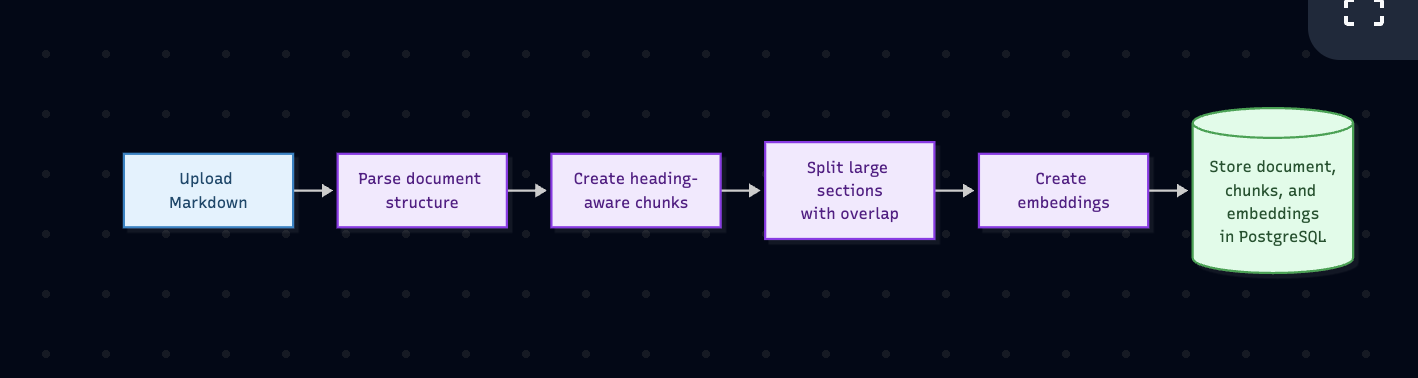
Upload flow — turn a Markdown document into searchable chunks.
Query flow — take a user's question, retrieve useful context, and generate an answer.
Tech Stack
Backend: Python and FastAPI
Database: PostgreSQL with SQLAlchemy
AI: OpenAI-compatible text and embedding APIs, with Ollama for local generation
Retrieval: NumPy cosine similarity
Tooling: Docker and uv
Upload Flow
The upload flow starts when a user uploads a Markdown file with a short description of what the document contains.
First, the document is parsed into a structured tree containing its title, sections, subsections, headings, and content. I use the main LLM for this parsing step because Markdown files can have different structures. If the request times out, encounters a network error, or returns invalid JSON, a simpler regex-based parser falls back to reading the Markdown headings.
Next, the section tree is converted into chunks. Instead of cutting the document at arbitrary positions, each section becomes a meaningful chunk and keeps a breadcrumb such as:
Troubleshooting > Files Not Syncing
If a section is larger than 2,000 characters, it is split into smaller windows with a 200-character overlap. The overlap prevents useful context near a boundary from being lost.
Each chunk is then sent to the configured embedding API. The returned embedding, chunk text, heading information, and breadcrumb are stored in PostgreSQL. Embeddings are currently stored as JSON arrays rather than using pgvector directly.
I chose this approach because it keeps the implementation easy to inspect. PostgreSQL stores all document data in one place, while calculating cosine similarity in Python makes the retrieval logic visible instead of hiding it behind a vector database. This works well for a learning project and a small number of documents, although pgvector would be a better option at a larger scale.
Query Flow
The query flow begins by understanding the question, then decides how much context is needed before searching the document.
Step 1 — Handle Follow-Up Questions
The system checks for phrases such as "tell me more", "continue", and "what about". A normal question continues unchanged. For a follow-up, the last five cached question-and-answer turns for the document are loaded.
The main model, with Ollama as fallback, then chooses one of three actions:
Answer: the recent history already contains enough context, so return an answer immediately.
Clarify: the reference is unclear, so ask the user what topic they meant.
Search: rewrite the follow-up as a standalone question and continue through the pipeline.
If no history exists, the API asks the user to clarify rather than searching for an ambiguous phrase.
Step 2 — Classify the Question
The prepared question is classified using simple keyword rules:
Definition:
what is,define,explain, orwhat doesHow-to:
how do I,how to,steps,install, orset upComparison:
vs,compared to,difference, orbetterTroubleshooting:
why doesn't,error,problem,fix, orbrokenFactual: the default when no other rule matches
The type then chooses the retrieval mode:
Quick: definition and factual — top 3 chunks, threshold 0.78
Balanced: how-to — top 5 chunks, threshold 0.68
Detailed: comparison and troubleshooting — top 10 chunks, threshold 0.58
Step 3 — Check the Cache in Two Ways
Before validation or retrieval, the system checks whether the question has already been answered:
Exact match: normalize the question to lowercase and collapse extra spaces.
Semantic match: embed the question and compare it with previous question embeddings. A score of 0.90 or higher is a cache hit.
On either hit, the stored answer is returned immediately with cached: true. Scores between 0.85 and 0.90 are logged as near misses but continue through the pipeline.
Step 4 — Validate the Question
On a cache miss, the main model checks that the question is both related to the document description and written as a clear question rather than disconnected keywords. Invalid questions return isValid: false with a short reason. If the validation call itself fails, retrieval is allowed to continue instead of blocking the user.
Step 5 — Retrieve Relevant Chunks
The question is converted into an embedding and compared with every stored chunk embedding using cosine similarity in Python. Chunks must:
pass the selected mode's minimum threshold,
remain within 0.12 of the best score,
and fit within the mode's
top_klimit.
If nothing passes the threshold but weak matches exist, those nearest chunks are given to the main model to rewrite the query. Ollama is used if the main model fails. Retrieval is then attempted one more time. If the retry also fails, answer generation receives no chunks and returns no match.
Step 6 — Generate the Answer
The retrieved chunks and prepared question are sent to an answer model. A deterministic keyword check chooses the model order:
Simple question: Ollama first, then the main model as fallback.
Other question: main model first, then Ollama as fallback.
The model returns structured JSON containing whether the chunks actually satisfy the question and the answer message. If the chunks do not support an answer, or both models fail, the API returns "No matching information was found for your question."
Step 7 — Save and Return
Only successful answers are saved to conversation_history, together with the normalized question and its embedding. This row is used by both future cache lookups and follow-up resolution.
The result is logged as pipeline.answer_found or pipeline.answer_not_found, and the final response includes the original question, the query actually used for retrieval, whether retrieval rewrote it, its question type, retrieval mode, and cache status.

The cache is important for cost and latency, while validation and answer checking are important for correctness. Query rewriting improves recall when the user's wording differs from the document. Together, these steps make the system more reliable than a pipeline that simply retrieves the closest chunk and always asks an LLM to answer.
Key Features Beyond Basic RAG
The core RAG flow is only part of the implementation. I added several features around it to make the system more useful and resilient.
Conversation History
Conversation history makes short follow-ups understandable. Instead of embedding "tell me more" directly, the system uses recent turns to determine what the user means.
Query Rewriting
Query rewriting gives retrieval one more chance when the original question does not find a sufficiently similar chunk. The nearest weak chunks provide useful vocabulary for producing a better standalone query.
Model Routing
Model routing uses a deterministic keyword check. Simple questions such as definitions can be handled by a smaller local Ollama model, while questions involving comparison, architecture, integration, or troubleshooting go to the main model.
Fallbacks
Fallbacks prevent one model failure from breaking the whole request. Answer generation, follow-up resolution, and query rewriting can fall back to Ollama if the main model fails. Simple answer generation can also fall back in the opposite direction.
Caching
Caching supports both exact and semantic matches. Found answers are stored with the normalized question and its embedding, so repeated and closely paraphrased questions can return immediately.
Metrics and Rate Limiting
The project also records query events for metrics and applies simple per-IP rate limits. These are not part of RAG itself, but they helped me understand the operational pieces that surround a real question-answering system.
Limitations
This is a learning and portfolio project focused on understanding how a RAG system works end to end, so some production concerns are intentionally out of scope.
No frontend yet. The main goal was the RAG pipeline itself; the API is used through Swagger (
/docs) orcurl.Markdown only. Chunking relies on Markdown headings. Other formats such as PDF, DOCX, and HTML could be supported by converting them to Markdown before upload.
pgvector is not used directly yet. Embeddings are stored as JSON arrays in PostgreSQL and scored with cosine similarity in Python. This is fine for a few documents, but pgvector with an index would move the search into PostgreSQL and scale much better.
Embedding search only. There is no keyword or full-text search alongside it, so exact terms such as error codes and version numbers can be missed.
One document per query. Questions cannot currently span multiple documents.
Shared history per document. Follow-ups use the last five question-and-answer turns for the document, rather than maintaining separate history per user or session.
Conclusion
Building this project showed me that RAG is much more than placing a document inside an LLM prompt. The quality of the final answer depends on how the document is chunked, how context is retrieved, how weak queries are rewritten, and how unsupported answers are rejected.
The most useful lesson was that many reliability improvements happen around the LLM, not inside it. Caching reduces repeated work, validation avoids irrelevant searches, conversation history makes follow-ups meaningful, and model routing balances local generation with a stronger fallback.
This implementation is intentionally small and transparent, but it covers the complete path from document upload to a grounded answer.